
The default firewall in Ubuntu 16.04 and derivatives is UFW – Uncomplicated Firewall.
In this post, we will see how to perform the most basic operations with this firewall: enable it, disable it, and open and close ports.
To manage the firewall, open a terminal as root.
Status
Run the following to find out whether the firewall is enabled or disabled:
ufw status
Enable
To enable the firewall:
ufw enable
Disable
To disable the firewall:
ufw disable
You can also stop the daemon and disable it.
Stop the ufw daemon
systemctl stop ufw
Disable the ufw daemon
systemctl disable ufw
Default rules
Set the firewall’s default rules.
Default rule for incoming connections
ufw default deny incoming
Default rule for outgoing connections
ufw default allow outgoing
Open ports
In this example, we open port 22, port 80 TCP, and the range 12000 to 12999 UDP:
ufw allow 22
ufw allow 80/tcp
ufw allow 12000:12999/udp
Close ports
If we want to deny access to port 443:
ufw deny 443
Delete firewall rules
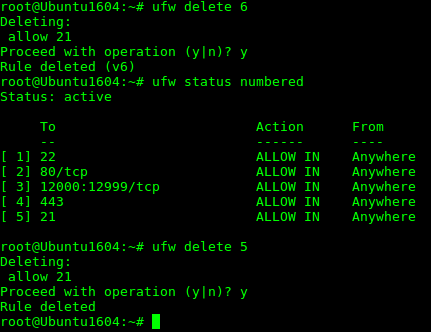
If we want to delete a firewall rule, we can do so in two steps. First, identify the rule’s position and then delete it.
ufw status numbered
The previous command lists the firewall rules and shows a number associated with each rule. Once we know the number of the rule we want, we delete it:
ufw delete 5
Then confirm with “y” to delete the rule.
In the image example, we want to delete the rule that allows access to port 21.
IPv6
The firewall is also prepared to work with IPv6 in the same way.
Just make sure that the IPV6 value in the «/etc/default/ufw» file is set to yes «IPV6=yes«.